
Exposure to the right has always been important in digital photography. Thats the best way to record the most information camera can capture. Olympus cameras, OMDs and most Pen-cameras, can be configured so that your exposure is perfect everytime.
I made a little tutorial video on how to set up the menus so for the best practice to get perfect exposired. This method was firsr discovered by a finnish photographer Pekka Potka. His blog post about it is no longer available so I made a new one.
The steps to set up your camera:
1. Shooting menu 1 > the triange (4th from top) > raw
2. Shooting menu 1 > Picture Mode > contrast -2, saturation -2
3. Custom Menu D > Info settings > info >Highlight & Shadow: On (Histogram: Off)
4. Custom Menu D > Histogram Settings > Highlight 254-245 and Shadow 1-8
5. Custom menu D > LiveBoost: Off
6. Custom Menu G > Color Space: AdobeRGB
7. Custom Menu G > AutoWB > Keep Warm Color: Off
The screen shot from Lightroom shows the histogram of the image that was shown in the video:
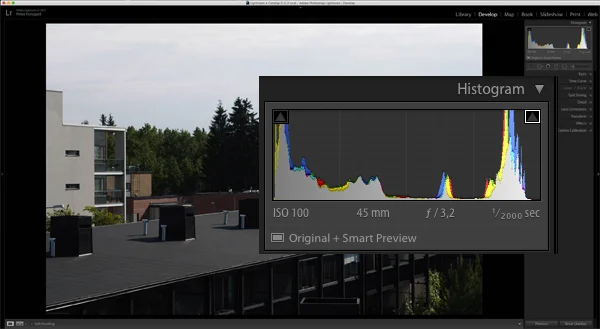
As you can see the histogram is almost perfect for and the exposure is correct.
Be sure to watch the video for some more info. Remember to subscibe my YouTube-channel.
Disclamer:
I am an Olympus European Visionary and only look into a mirror at home before going out.