Category: Tutorial

  • Tutorial – Using Olympus Episode 6: MF Clutch

    Tutorial – Using Olympus Episode 6: MF Clutch

    Have ever thought that your Olympus cameras Auto Focus is broken? Well most likely its not, check out the video above and find out how to fix it.

    MF Clutch is in the following M.Zuiko PRO lenses:

    ED 7-14mm f2.8 PRO, ED 8mm Fisheye PRO, ED 12-40 f2.8 PRO, ED 12-100mm f4 PRO, ED 17mm f1.2 PRO, ED 25mm f1.2 PRO, ED 45 mm f1.2 PRO, ED 40-150mm f2.8 PRO, ED 300mm f4 PRO
     

    MF Clutch is in the following M.Zuiko Premium lenses:

    ED 12mm f2.0 and 17mm f1.8

    MF Clutch can be turned off in some Olympus bodies. Here is a list and instructions how to do it your Olympus camera:

    E-M1 (firmware 4.0) and Pen-F from Custom Menu A.

    Screen Shot 2018-06-06 at 20.10.40.png

    E-M1 MkII as shown in the video from Custom Menu A3. 

    Screen Shot 2018-06-06 at 20.14.11.png

    If you havent seen the previous episodes I recomend you to watch them. The whole Using Olympus playlist can be found here: https://goo.gl/9cPqo1

    If you have any questions please ask them in the comments!
  • Tutorial – Using Olympus Episode 5: Image Aspect Ratio

    Tutorial – Using Olympus Episode 5: Image Aspect Ratio

    In this video I go talk about the Image Aspekt Ratio and how to change it. Again my example was from OM-D E-M1 MkII, but in this blog post you can find how to change it in your Olympus.

    In the following Olympus cameras the Image Aspekt Ratio is changed in

    Shooting Menu 1:
    E-M1, E-M1 MkII, E-M5, E-M5 MkII, E-M10, E-M10 MkII, Pen-F and Pen E-PL8

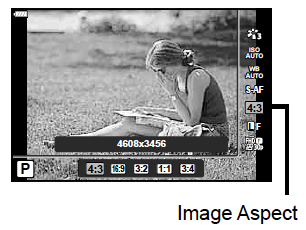
    In E-M10 MkIII and Pen E-PL9 press the OK-button and then you can find the Image Aspekt on the side. (image: Pen E-PL9 manual, Olympus)

    Screen Shot 2018-06-05 at 17.50.38.png

    If you havent seen the previous episodes I recomend you to watch them. The whole Using Olympus playlist can be found here: https://goo.gl/9cPqo1

    If you have any questions please ask them in the comments!
  • Tutorial – Using Olympus episode 3: Personalise your Olympus!

    Tutorial – Using Olympus episode 3: Personalise your Olympus!

    Personalising your Olympus is easy. Just write your name to the metadata and customize your filenames. My example in the video was OM-D EM-1 MKII. In this blogpost you will find where to find the features in your Olympus. 

    In E-M5, E-M5 MKII, E-M10, E-M10 MKII, E-M1, Pen E-PL8 and Pen-F  the Copyright settings and the Edit Filename can be found in the Custom menu H (Record and Erase)

    Screen Shot 2018-06-03 at 23.10.31.png

    in E-M10 MKIII and Pen E-PL9 the Copyright settings and the Edit Filename can be found in the Custom menu G (Record) 

    Screen Shot 2018-06-03 at 23.14.45.png

    And as shown in the video in OM-D E-M1 MKII the Copyright settings and the Edit Filename can be found in the Custom menu H1 (Record/Erase)

    Screen Shot 2018-06-03 at 23.20.09.png

    If you havent seen the previous episodes I recomend you to watch them. The whole Using Olympus playlist can be found here: https://goo.gl/9cPqo1

    If you have any questions please ask them in the comments!