
Category: Using Olympus

  • Tutorial – Using Olympus Episode 10: Adapters and Vintage lenses.

    Tutorial – Using Olympus Episode 10: Adapters and Vintage lenses.

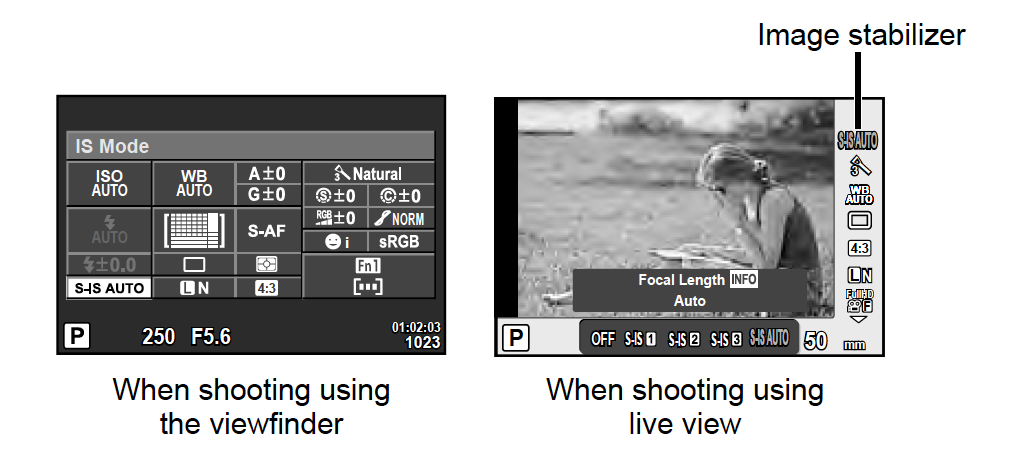
    You can use almost any lens on your Olympus. There is an adapter for every mount. In this video I talk about how to set information about the lens so that the stabilizer works best with the fully manual lens.

    In Pen-F the settings can found in the Custom Menu K.

    Screen Shot 2018-06-11 at 21.39.19.png

    In Pen E-PL 8, Pen E-PL9, E-M10, E-M10 MkII, E-M10 MkIII, E-M5, E-M5 MkII and E-M1 you can set the Lens info by pressing INFO button while image stabiliser is selected from the Super Control for example. 
    Screen Shot 2018-06-11 at 22.00.17.png

    If you havent seen the previous episodes I recomend you to watch them. The whole Using Olympus playlist can be found here: https://goo.gl/9cPqo1

    If you have any questions please ask them in the comments!
  • Tutorial – Using Olympus Episode 9: Silent Mode

    Silent Mode is very useful in many situations. In this tutorial I tell a few situations I have used Silent Mode. In the video the example was from E-M1 Mkii.

    Silent Mode can be found in the Shooting menu 2 in the following Olympus cameras:

    Pen-F, E-M5 MKII, E-M1 (firmware 4.0), E-M1 MkII


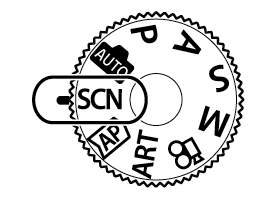
    In E-M10 MkIII and Pen E-PL9 it can be found  Scene Mode (SCN) 

    Screen Shot 2018-06-09 at 8.18.48.png

    Older models do not have the Silent Mode.


    If you havent seen the previous episodes I recomend you to watch them. The whole Using Olympus playlist can be found here: https://goo.gl/9cPqo1

    If you have any questions please ask them in the comments!
  • Tutorial – Using Olympus Episode 8: Raw or Jpg?

    Tutorial – Using Olympus Episode 8: Raw or Jpg?

    In this tutorial Episode Using Olympus I talk about the advantages of raw and jpg. and how to set them in your Olympus.

    In E-M5 it can be found in Custom Menu G
     

    Screen Shot 2018-06-07 at 22.07.25.png

    In Pen E-PL8, Pen-F, E-M10, E-M10 MkII, E-M5 MkII, E-M1, E-M1 MkII the Image format and jpg quality can found in the Shooting Menu 1 

    Pen E-PL9 and E-M10 MkII the jpog quality can be found in the Custom Menu F. The choice between raw or jpg can done in the Live Control. To access the Live Control press OK-button. 

    If you havent seen the previous episodes I recomend you to watch them. The whole Using Olympus playlist can be found here: https://goo.gl/9cPqo1

    If you have any questions please ask them in the comments!
