
Category: Videography

  • Insta360 One X2 – a FUN 360 camera

    Insta360 One X2 is the newest 360 action camera from Insta. It is a consumer-level camera. It will capture 360 views with its two cameras. It can record video at 5,7K and images with the resolution of 6080X3040 (360) and 4320X1440 in panorama mode.

    Fun features!

    Even though there is a really good use of 360 cameras in many ways real estate videography is one. The Insta360 One X2 is more of a “toy”. By that, I do not mean that the quality of the image or build quality is bad. On the contrary, it is well made and the image quality is very good. By saying it is a toy it means all the fun features you can do with it. The fun features include Bullet Time, Stop Motion, Clone Trail, etc.

    Some of the features are shown in my latest Sunday Shorts about Insta360 and a few of its fun features.

    Is there any serious use?
    IMG_2060.jpg

    Insta360 One X2 is waterproof to 10 meters. it can be used as an action cam. It can shoot of course 360, but also a 150-degree image. Also from the 360 images can be cropped any portion with Insta 360 app, Insta360 desktop app, or Premiere Pro. Premiere Pro needs a plug-in from GoPro. Yes, GoPro. It is called FX Reframe. With that, you can adjust the 360 images.

    With that, it is easy to make the 360 to a 16.9 “crop” from any part of the 360 videos. It can also be keyframed so that it looks like the camera is following you. That makes the Insta360 One X2 the best action camera right now. It is almost like you have a cameraman filming you.

    Most fun with the App.

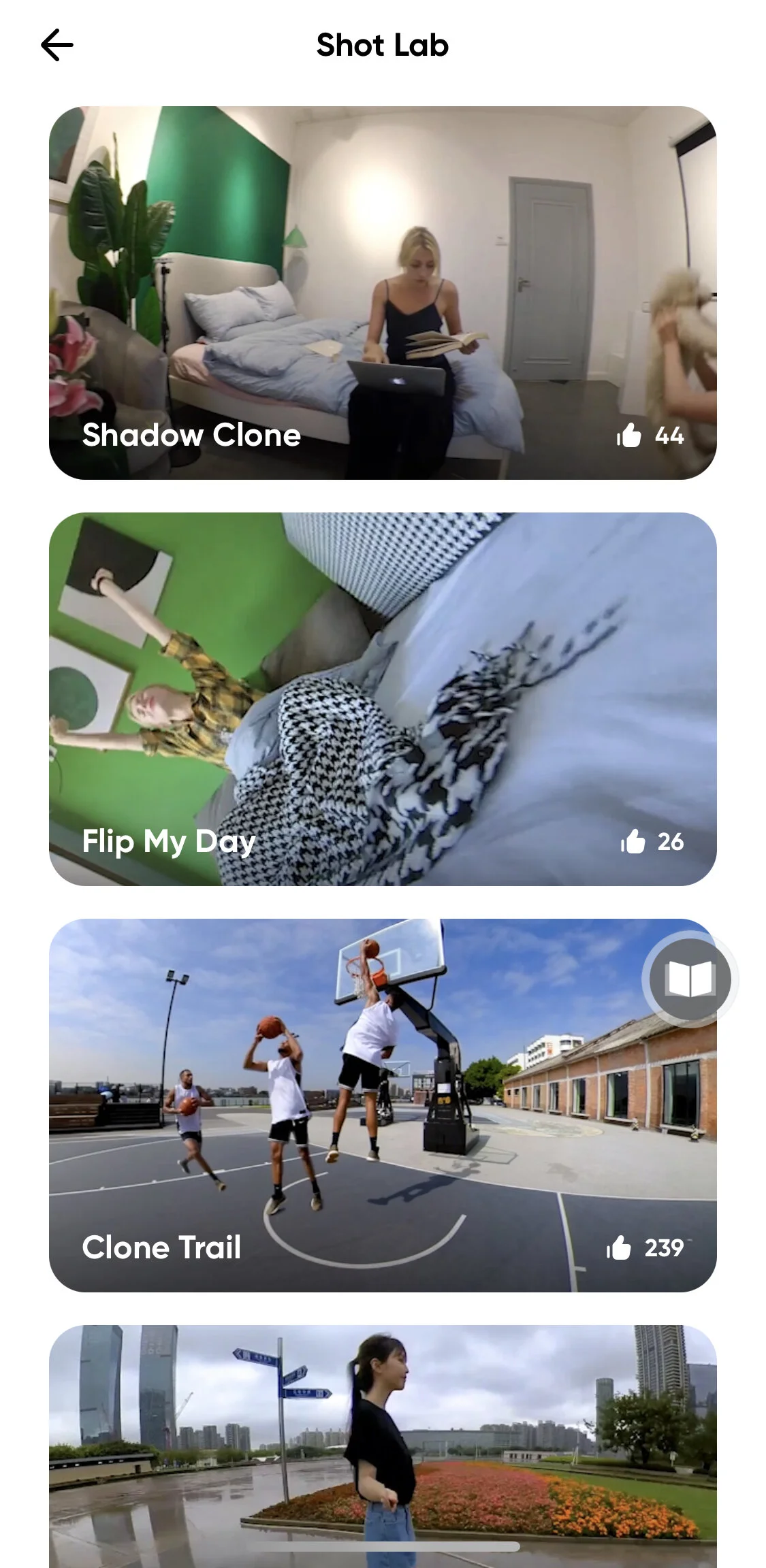
    With the Insta360 mobile app, you will the best out of the camera. Its app has a trick section where you can pick your effect and the app does it for you. There is also instruction on how to shoot so that the effect can be applied. On the left side, you can see a few of the effects you can do.

    This blog post was not sponsored by Insta360. I bought the camera. Wanted to write a small blog post about it because I really like the camera. I will be using it for B-roll on my YouTube-videos.

    More info and specs from Insta360 One X2 product page.

  • New lens and Firmware – 150-400mm f4.5 Pro is here!

    Olympus has launched the much-awaited telephoto zoom lens, the 150-400mm f4.5 Pro. The lens was first announced in January 2019. The same time when E-M1X was launched. Then of course it was a product development announcement. Now the lens reality and first real-life test have been done. The lens is available in January 2021.

    Jari Peltomäki tells us about the lens

    I have not had a chance to test it yet. It has been mainly tested by bird photographers here in the Nordic. I did have a chance to talk to a Finnish award-winning bird and nature photographer Olympus Visionary Jari Peltomäki. He has been testing the lens a few days. In the video, he also tells us what he had to with the production of the lens.

    New Firmware

    Four Olympus OM-D bodies got a new firmware. The new firmware includes Bird recognition to E-M1X and ProResRAW-video for E-M1X and E-M1 MKIII.

    Both of these new features are very interesting and make both bodies even better than they are now.

    Subject recognition in E-M1X

    Olympus E-M1X has subject recognition AF. It “knows” what motorsports, trains, and airplanes look like. Now the Ai-driven algorithm has been improved to include also birds. This one I had the chance to test. In the video below I give a sneak peek of the feature. A full video about it coming up next Friday.

    ProResRAW gives better video quality

    ProResRAW is compared to H.264 that Olympus camera records internally the same as the difference between shooting raw vs. jpg. That is the simple and quick answer to what raw video is. ProResRAW is compatible with Atomos Ninja V only. An external recorder is needed if you want to shoot raw-video.

    I have a blog post about ProResRAW. There is some more info about that. There will also be a dedicated video about ProresRAW on my channel.

  • ProRes RAW is coming to Olympus!

    Olympus has just released a new development announcement. Olympus E-M1 MKIII and E-M1 X will get Apple ProRes RAW by the end of this year. The recorder that will be able to record Apple ProRes RAW with these cameras is Atomos Ninja V.

    Screenshot 2020-09-13 at 11.51.12.png

    What is ProRes RAW?

    In short ProRes RAW is quite a similar idea as raw formats in photos. The quality is the best the sensor can capture. There are Apple ProRes RAW capable cameras where for example white balance or ISO that will be used can be chosen after the shoot. ProRes RAW is developed by Apple and if you are interested in reading more about the Apple ProRes RAW there is a white paper (.pdf-file) released by Apple.

    Another similar raw format for video is for example Blackmagic RAW.

    Apple ProRes RAW features

    It is not totally clear what features ProRes RAW from Olympus E-M1 MKIII and E-M1X will be available. Their press release about it says:

    “This lends greater flexibility to professional video production post-processing tasks such as adjusting exposure and color grading recorded footage.” 

    This is promising and will make Olympus E-M1 MKIII and E-M1X even better video cameras than they are now.

    Combined with IBIS and great AF

    I am very excited about this new development. ProRes RAW combined with Olympus great IBIS and very good AF in the video will make E-M1 MKIII and E-M1X very interesting video cameras. The quality of the footage is excellent as it is now. Lack of some features like vectorscopes etc. are things that I would really want to see in an Olympus body. Apple ProRes RAW will make some of that up. It will interesting to see the final version when it is out later this year.

    Final Cut Pro X is the best option for editing, at least for now.

    If I have understood correctly Apple Final Cut Pro X is the best editing software right now that can handle ProRes RAW. Adobe Premiere and DaVinci Resolve can also handle ProRes RAW. You need to download video format 2.1.1 to later from Apple in order to be able to use Premiere Pro for editing ProRes RAW format. Let’s see if I need to switch to Final Cut Pro X when the codec is available in Olympus cameras.

    All in all very good move from Olympus. In a recent interview with JIP (the company that will buy Olympus imaging business) said:  “JIP also plans to focus on the “video business” which so far Olympus hasn’t really focused on: “We are considering various markets such as consumer products specialized for video and business such as surveillance cameras” (from m43rumors.com)

    Let’s hope that this means new features in video specs for new Olympus cameras.

    disclaimer: Some of the links might be affiliate links. If you buy something using these links I will get a small commission. You do not pay any extra. It is a win-win situation.